We take the time to listen! When should I fix my PC/Laptop or buy new?

It’s certainly not something we like to plan on, but if your computer/laptop is blue screening or locking up and it’s 3-5 years or older it can sometimes be related to hardware failure. At that point you need a reliable trustworthy technician to diagnosis the problem and asses whether the repair costs are worth repairing or if its time to purchase a new PC/laptop.

We actually deal with this situation quite frequently.  My work is my livelihood so it is important to me that you are happy with the service and advice you receive. We offer hassle free ways to fix and keep your computers running at their top performance. We work full-time and are focused on providing computer repair services offering FREE pick-up and delivery to the Gold Canyon-AJ areas. 

- We come to your Residence or Business
- Flat-rates (Diagnostics are FREE with service, Tune-up $50, Repairs $75,
  Ba
ck-up $25 add-on, OS Replace/Reinstall $25 add-on, On-site $75+ details)
- Free Pick-up and delivery (Gold Canyon – Apache Junction areas)
- Certified & Insured

We’ve learned it’s about educating the RIGHT customers about the benefits. Our core focus when building a new custom computer (whether home based, small business or single entrepreneur) is with our customer’s future computing needs in mind. We know computers are not and should not be easily discarded because it’s so cheap to buy a new PC. Our warranty is simple. Local, one point-of-contact, no hassle. It is truly our goal to make sure our customers are happy with the finished product and to be repeat/returning customers.  

GCCRepair.com Custom Built ComputersWe custom-built computers are built with your future computing needs in mind. We will customize giving you more control over the configuration to enable easy upgrading. For example, as you download software, videos, and pictures or add new programs to your computer overtime your computer will surpass its storage capacity. Some benefits include:  


Personal Service
• Includes full set-up. No trial software.

Superior Warranty & Ongoing Support
• receive better service after the sale
• no hassle warranty, one point-of-contact
• includes full set-up of your new computer
   – including your printer, scanner,  unpacking, wiring and set-up, etc.
   – reinstall all of your software  (Microsoft Office, Antivirus, etc)
   – updating missing critical security updates
   – moving all your old emails, favorites and contacts to the new computer
• green computing solution
   – extending the life of your computer as your computing needs change
   – take a responsible role and have a plan for disposal of old computer parts

 Quality Parts

We use ONLY top name brand parts, with your future computing in mind (easy to upgrade, extending the life of your computer).

If you’re having a problem with your computer, shopping for a new computer, want to find out if a custom built computer is the right choice for you or if you need a part and/or advice or if you  just  want to drop us an email (dennis@gccrepair.com)  to tell us what we’re doing right (or if we need to change something).

Call Us Today 480-262-9598.

Share
Posted in Featured by gccrepair. Comments Off

It’s Dusting Time: Developing a Computer Cleaning and Maintenance Plan (by Gold Canyon Computer Repair)

Dusting and computer maintenance is often something that is neglected going un-noticed until the computer starts to run slow. I’ve heard it all from I do my own cleaning and maintenance or I’ll just buy a new PC if it gives me problems. Whether you’ve committed to doing it yourself or having a computer professional perform routine maintenance and cleaning on your computer or laptop the important point is to keep up with it.

Annual PC Tune Up: Recommended maintenance every 6 months

Has your computer become slow & sluggish? At Gold Canyon Computer Repair a PC and/or Laptop Tune-up includes:

  1. Running a series of utilities to clean your machine, delete unwanted files, perform disk clean-up, install Windows critical updates and if required,
  2. Defragging your hard drive.
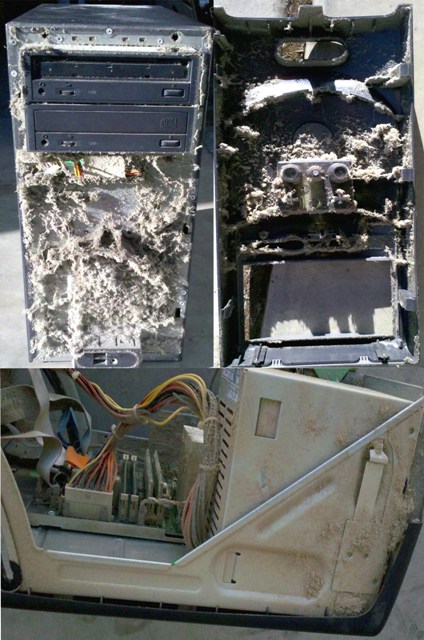
  3. This also includes Physical Cleaning removing dust and pet hair which will optimize airflow and keep `computer to be properly cooled.  Build up of dust can impact the health of your family and pets so if you see dust building up on the outside it might be time for a cleaning inside as well.


When was the last time you cleaned your computer inside and out? Since a picture is worth a thousand words below is a BEFORE image of computer submitted by a customer desperately in need of a tune-up and clean-up.


GCCRepair Customer Computers Before PC-Tuneup 2011

A picture is worth a thousand words

Share

A Case for Having a Computer Maintenance and Compliance Checklist?

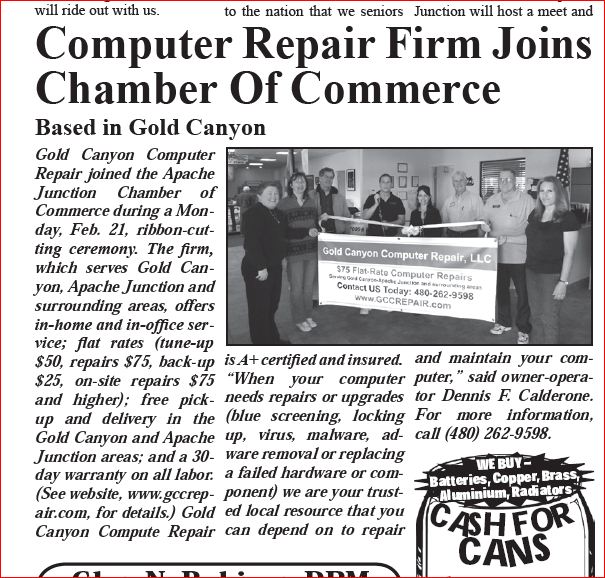
Gold Canyon Computer Repair Apache Junction Chamber Ribbon Cutting 2/21/11

Gold Canyon Computer Repair Apache Junction Chamber Ribbon Cutting 2/21/11

When I think about compliance I think about how it relates to our health and wellbeing and what it means as it relates to ’patient compliance’:

  • taking medications
  • following doctor orders
  • exercising
  • eating healthy and keeping our weight on target

What if we consider undertaking a compliance checklist as it relates to computer consumers.  A list relating to maintenance and upkeep, that is both novice and senior friendly, considering technology that has the capacity to be ‘upgraded’ overt time as we add programs and download more music, videos and pictures, etc.

Building a Simple computer maintenance and upkeep checklist:

• If you are in the market for purchasing new technology (PC and/or laptop), keep in mind your future computing needs. Upgrading your existing PC overtime is often the more affordable and green solution. A new computer that is up to date and can handle upgrades like adding more memory for faster web surfing, multi-tasking, printing etc.  Things to consider: how many memory slots are on the motherboard and what is the maximum RAM/cache your motherboard can support.

• Keep up with Annual Maintenance with a PC Tune-up (recommended maintenance every 6 months). PC Tune-up: Includes running a series of utilities to clean your machine, delete unwanted files, perform disk clean-up, install Windows critical updates and if required, defrag your hard drive. This also includes Physical Cleaning removing dust and pet hair which will optimize airflow and keep your computer properly cooled.

 • Running an Anti-Virus  program (free.avg.com/ is a trusted free antivirus and anti-spyware security software for Windows 7, Vista and Windows XP).

 • Most Common Performance Upgrades (Adding memory) or Replacing failed components such as a hard drive, power supply, network card & motherboard are some of the leading performance upgrades that will extend the life of your computer.

• Keeping our e-mail inbox at a manageable size. Creating GROUPS and SUB-FOLDERS within groups is a simple way to clean-up a bulky mail box (inbox, sent, draft folders).

• Routinely backing up data and other files

• After time your computer builds up a backlog of debris from software, ads and other unwanted programs, take an inventory of programs you no longer use and remove them to free up space.

Share

CUSTOMER FAQ’S, Services and Common Repairs (by Gold Canyon Computer Repair)

Here are a few Q&A’s that we hope will make you re-consider the importance of reducing waste, recycle old part and reusing or upgrading components to extend the life of your equipment. 

Gold Canyon Computer Repair, LLC (High Performance, Superior Service & Quality Parts)
Gold Canyon Computer Repair, LLC (High Performance, Superior Service & Quality Parts) 
Consumer’s question: Why should I bother with the hassle of maintaining my computer when I can just by a new one?  

Our response: We specialize in maintaining and repairing desktop computers and laptops. Simply put, maintaining your computer or laptop can save you money, extend the life of your equipment and ultimately result in fewer problems and less down-time,

Consumer’s question: Why hassle with disassembling your computer from your home and bringing it to a repair shop for an annual tune-up (or other repairs e.g., virus/adware removal, part replacement, software issues, etc)?

Our response: We come to your Residence or Business (no more disassembling and dragging your computer/laptop to a repair shop). Whether you want to maintain or repair a problem encumbering your computer’s performance we can help. We also provide on-site repairs, service and sales (custom built computers and parts).

CUSTOMER FAQ’S About The Services We Offer and Common Computer Issues and Repairs:
Services and Equipment We Repair:
We service and repair personal computers and laptops. 

Computer Services:  
Diagnostics, Installation, Upgrades, Repairs and Sales: ● Hardware ● Software ● Operating System.

Other Computer Repairs and Service Examples:
Adding memory, computer set-up, custom computers, data backup, firewalls, hardware installs, Internet browser conflicts, compatibility with web applications, pc purchasing, laptop setup, networking (new set-up, connecting a computer to an existing network), printers set-up,  virus/malware/adware removal, software installs and configuration (Windows OS, Microsoft Office), third party software set-up/installation (webcams, modems, external storage, PDAs, fax, digital media players) .  

Most Common Performance Upgrades Replacing failed components such as a hard drive, power supply, network card & motherboard are some of the leading performance upgrades that will extend the life of your computer.

Green Computing by Gold Canyon Computer Repair:

Annual PC Tune Up (Now ONLY $50!) Recommend maintenance every 6 months.
Has your computer become slow & sluggish?
PC Tune-up: Includes running a series of utilities to clean your machine, delete unwanted files, perform disk clean-up, install Windows critical updates and if required, defrag

Gold Canyon Computer Repair - "E" Waste Recycling

your hard drive. This also includes Physical Cleaning removing dust and pet hair which will optimize airflow and keep `computer to be properly cooled. When was the last time you cleaned your computer inside and out?

“E” Waste Recycling:
Computer Equipment & Parts (FREE). We accept computers, hard drives, monitors, printers and other computer equipment from all customers for donating to education and community non-profit organization StRUT. StRUT will use aging or broken computers and other equipment to teach high school students valuable high-tech skills. 

Share

Let’s Get Down and Green – Reduce, Recycle, Reuse (by Gold Canyon Computer Repair, LLC)

We are firm believers in being pro-active about computer maintenance and backups. Here are a few Q&A’s that we hope will make you re-consider the importance of reducing waste, recycle old part and reusing or upgrading components to extend the life of your equipment.

Gold Canyon Computer Repair, LLC (High Performance, Superior Service & Quality Parts)

Gold Canyon Computer Repair, LLC (High Performance, Superior Service & Quality Parts)

Consumer’s question: Why should I bother with the hassle of maintaining my computer when I can just by a new one?  

Our response: We specialize in maintaining and repairing desktop computers and laptops. Simply put, maintaining your computer or laptop can save you money, extend the life of your equipment and ultimately result in fewer problems and less down-time,

Consumer’s question: Why hassle with disassembling your computer from your home and bringing it to a repair shop for an annual tune-up (or other repairs e.g., virus/adware removal, part replacement, software issues, etc)?

Our response: We come to your Residence or Business (no more disassembling and dragging your computer/laptop to a repair shop). Whether you want to maintain or repair a problem encumbering your computer’s performance we can help. We also provide on-site repairs, service and sales (custom built computers and parts).

CUSTOMER FAQ’S About The Services We Offer and Common Computer Issues and Repairs:
Services and Equipment We Repair:
We service and repair personal computers and laptops.

Computer Services:  
Diagnostics, Installation, Upgrades, Repairs and Sales: ● Hardware ● Software ● Operating System.

Other Computer Repairs and Service Examples:
Adding memory, computer set-up, custom computers, data backup, firewalls, hardware installs, Internet browser conflicts, compatibility with web applications, pc purchasing, laptop setup, networking (new set-up, connecting a computer to an existing network), printers set-up,  virus/malware/adware removal, software installs and configuration (Windows OS, Microsoft Office), third party software set-up/installation (webcams, modems, external storage, PDAs, fax, digital media players) .

Most Common Performance Upgrades Replacing failed components such as a hard drive, power supply, network card & motherboard are some of the leading performance upgrades that will extend the life of your computer.

Green Computing by Gold Canyon Computer Repair:

Annual PC Tune Up (Now ONLY $50!) Recommend maintenance every 6 months.
Has your computer become slow & sluggish?
PC Tune-up: Includes running a series of utilities to clean your machine, delete unwanted files, perform disk clean-up, install Windows critical updates and if required, defrag

Gold Canyon Computer Repair - "E" Waste Recycling

your hard drive. This also includes Physical Cleaning removing dust and pet hair which will optimize airflow and keep `computer to be properly cooled. When was the last time you cleaned your computer inside and out?

“E” Waste Recycling:
Computer Equipment & Parts (FREE). We accept computers, hard drives, monitors, printers and other computer equipment from all customers for donating to education and community non-profit organization StRUT. StRUT will use aging or broken computers and other equipment to teach high school students valuable high-tech skills.

Share

Giving Us Your Opinion

Create your free online surveys with SurveyMonkey, the world’s leading questionnaire tool.

This is a quick three question survey. Your answers will be kept completely confidential and used in an aggregated form via Survey Monkey.

Share

Service After the Sale: A recent customer’s experience and another great reason to shop local (by Gold Canyon Computer Repair, LLC)

Question of the Day Why Shop Local –vs.- Big-Box Retailer?

Another example of why shopping local makes sense. I had a customer recently that purchased a laptop the from local big-box retailer ‘the geek something or other’ because their old laptop was too costly to repair. They also purchased a wireless TV adapter that would enable them to wirelessly connect from their laptop to their TV. Seems like a pretty cool feature right? They had a problem with the laptop and since they just purchased the laptop naturally they brought it back to the retailer and they proceeded to inform them that in order to fix the problem it would cost an additional $200+. Remember the laptop is brand new she just purchased it at this big-box retailer. They offered a 2nd option which was a brand new laptop replacement. 

Needless to say they went with the NEW laptop and we were able to get them up and running and connecting wirelessly to their TV. 

THEM: Yet another local customer and business owner went to Staples to enquire about Virus Removal and their charge is $199 (per the customer’s quote 5/4/11).

OUR RATES: Virus Removal ($75): Includes removal of virus, spyware, pop-ups and adware  infecting your computer. Service includes updates to your existing anti-virus and anti-spyware software to keep your system secure. 

So how much is too much? We are confident in what we offer. In fact, we know we will beat the big-box retailers every time by providing the highest level of quality customer service. Our core focus when building a new custom computer (whether home based, small business or single entrepreneur) is with our customer’s future computing needs in mind. We ONLY use top of the line quality parts that we’ve personally tried and tested, from reliable part dealers/sources to build the fastest, most reliable and affordable custom PCs. We know computers are not and should not be easily discarded because it’s so cheap to buy a new PC. Our warranty is simple. Local, one point-of-contact, no hassle. It is truly our goal to make sure our customers are happy with the finished product and to be repeat/returning customers. 

OUR MISSION: to create a high quality service experience that keeps them coming back.   

Computer Repairs: Dennis Calderone, Owner/Operator.
Email: dennis@gccrepair.com
Social Media Questions Contact: Stephanie Calderone Email: stephanie@gccrepair.com
Gold Canyon Computer Repair, LLC
www.gccrepair.com
blog: www.goldcanyoncomputerrepair.com 

Share

Community Awareness: ways to get involved with cause-driven projects (by Gold Canyon Computer Repair)

One of my favorite things about social media is meeting new people whether business professional, non-profit and/or local residents. I get exceptionally energized when I learn about projects and initiatives that have a focused cause behind them. A few entries specifically spoke to me since I have a passion for all things local, medical and inspirational so when I learn about local people or events encouraging people about improving health and awareness I am immediately engaged.

Community Awareness

Community Awareness: cause-driven projects

I was reading this month’s edition of the ADOBE Gold Canyon Ledger (March 2011)  www.gcledger.com

  • Gold Canyon Pride Volunteers, this local group of ambitious dedicated volunteers from A.D.O.B.E. are working really hard to help keep our community clean. They’re also encouraging businesses to be intentional about their landscaping by honoring establishments with a “Landscape of the Month Award”. This really brings home a sense of pride and is so rewarding. HOW CAN YOU HELP? Volunteers are always needed for all projects and behind-the-scenes clerical activities. Please contact Jill Moritz 480-671-0620 or jill@thepaperworkpro.com
  • March is Colorectal Cancer Awareness Month, I have to disclose that this article really means a lot to me since my mom wrote it. She’s a local Gold Canyon resident & blogger who is choosing to share her colorectal cancer survivor story because early detection can save lives.  It is her desire to advocate for testing and early diagnosis, her blog ministry is all about encouraging cancer survivors and families to help them during their diagnosis and treatment. Also, she’s using her blog, Facebook, Twitter to connect with non-profit organizations and to help bring awareness to organizations that help people in need. HOW CAN YOU HELP? Dee Dee is bringing awareness in honor of Colorectal Cancer Awareness Month to the Osto Group which is a non-profit organization that offers ostomy supplies to patients nationwide for those who do not have medical insurance or their insurance doesn’t cover their supplies.  Please visit the Chat With Dee Dee Blog http://chatwithdeedee.wordpress.com to learn more about this opportunity and other encouraging efforts Dee Dee is advocating on behalf of.
  • Face in the Mirror, non-profit local Scottsdale organization offering After Care for Cancer Patients. The recovery is always the hardest part and this organization is approaching patients, hospitals and clinical with ways to relax; celebrate life and continued ways to care for patients after the diagnosis and treatment. TO LEARN MORE or get involved contact Face in the Mirror 480-443-1344 or 866-410-3223 or www.faceinthemirror.org
  • Annual Healthy, Wealthy and Wise Event in Gold Canyon. Exhilarating, informative health and nutrition focused education and financial event. You won’t want to miss the opportunity to learn from experts and meet other ‘empowered’ Gold Canyon women. Complete EVENT DETAILS visit www.goldcanyonbank.com or contact Debbie Jusko 480-336-5087 djusko@goldcanyonbank.com

I want to encourage you to find a local charity or cause that speaks to you and get involved. You make your online presence more meaningful when you approach it with a cause.

Warm regards,

Stephanie Calderone
Gold Canyon Computer Repair, LLC

http://www.gccrepair.com or http://www.goldcanyoncomputerrepair.com
Dennis@gccrepair.com  (Owner/Operator)
Stephanie@gccrepair.com (Social Media)

Share

5 Valuable Takeaways – Producing Advertising That Works (Feb. 2011 GCBA Meeting)!

Last night at the monthly Gold Canyon Business Association (GCBA) meeting we were very fortunate to have a panel of local advertising representatives speak about advertising methods that can help grow and promote our business.

To be honest with you for the most part I’ve avoided print advertising based on what other local companies have shared (little to no ROI), the cost of advertising is so high for a small home based business and I felt for the most part our customers come from word of mouth referrals.

Last night certainly sparked more of my interest in that now that I’ve been educated a little more about the benefits of local advertising I feel I might just be the right customer.

5 Important Takeaways that stuck with me about advertising:

1. Ray’s Printing: Keep it simple, include a phone number, use a headline that sells and repetition (be visible on a routine basis). When things are slow sometimes you should advertise more.

2. Stacy at Today’s Publications: Use multiple marketing strategies. Your SEO must reach all angles (website points to social media which points back to your website).  Today’s Publications has donated three months of print advertising to ALL GCBA Members. What a great start!

3. The Independent Newspapers Foothills Publishing, Inc. has been serving advertising needs of AJ/Gold Canyon as the ONLY Hometown Newspaper for the Apache Junction, Gold Canyon, and Peralta & Queen Valley area. Pinal County’s largest circulation newspaper.

4. KRDE 94.1FM shared that they take the time to develop a marketing pitch that makes you stand out. They are running a special for GCBA Members to double air time for $1. They’re also doing a free advertising giveaway which you can enter at their booth at the Lost Dutchman Days Rodeo. They’re certainly creating solutions that can help your business stand out.

5. Lastly I think it’s important to listen to what customers want, watch patterns and add the element of surprise for your customers. So perhaps since I haven’t been advertising in print media this could be the best time to start.

Thanks again to the local marketing representatives that came out to the local GCBA meeting to help educate US (local business owner) about affective advertising methods to reach our ideal customers.

Warm regards,

Stephanie & Dennis Calderone
Gold Canyon Computer Repair, LLC
http://www.gccrepair.com or http://www.goldcanyoncomputerrepair.com
Dennis@gccrepair.com  (Owner/Operator)
Stephanie@gccrepair.com (Social Media)

Share

HELP DESK TIP: Your mailbox is almost full (By Gold Canyon Computer Repair, LLC)

You may have recently received an Outlook reminder your Mailbox is almost full and is reaching the 2000+ MB capacity. So now what? Let’s look at a few practical and simple steps to increase space in your mailbox.

Grouping Emails

1. KEEP PILE
Creating GROUPS and SUB-FOLDERS within groups is a simple way to clean-up a bulky mail box (inbox, sent, draft folders). I suggest using a naming convention that you will remember and can easily relate to. For example, you might have a number of groups with sub-folders within each group as follows.
• Personal (GROUP FOLDER)
   Sub-folders with-in group
   o Family  
   o Friends  
   o Church 
   o Organizations

Professional (GROUP FOLDER)
Sub-folders with-in group
  o Clients 
  o Partners
  o Organizations

2. MAYBE  (GROUP FOLDER)
These are the e-mails you aren’t sure if you want to save or toss. I suggest you save all of these emails temporarily under one group folder and take your time reviewing to decide whether to keep, delete or save to file and redistribute to appropriate group and/or another source (USB Key, External Hard Drive, Online Source (box.net, dropbox) as time permits. 

You can read in one of our previous posts title CAUTION Basic Rules Before Hitting Send (helpful tips about and links to resources for FREE file, photo and video Sharing tools.)

3. DELETE & EMPTY YOUR DELETED & SENT ITEMS FOLDERSet the Deleted Items folder to be emptied automatically
You can choose to do this manually or set-up an automatic rule for deleted & sent items to be emptied automatically.

Mailbox Clean Up

You can take a more detailed look at Outlook including manging and cleaning up your inbox in the below presentation we’ve prepared an Overview of Microsoft Outlook 2007.

I hope you find these tips helpful.
Warm regards,

Stephanie & Dennis Calderone
Gold Canyon Computer Repair, LLC
http://www.gccrepair.com or http://www.goldcanyoncomputerrepair.com
Dennis@gccrepair.com  (Owner/Operator)
Stephanie@gccrepair.com (Social Media)

Share

Three Easy Ways for YOU to save money and time with your computer (by Gold Canyon Computer Repair)

1. Backup your data (We offer data backup @  the low cost of $25, or DIY @ box.net 5 GB Free online storage).

Start saving, three easy ways Start saving, three easy ways

Don’t wait to pay costly retrieval fees after your hard drive fails and all of your data is lost.

2. Free Web-based apps(Instead of Photoshop try Splashup and Instead of Quicken try Mint.com, Instead of Excel try Zoho Sheet, Instead of Microsoft Word try Zoho Writer. Instead of FrontPage or Dreamweaver try WordPress for blog and website design.)

3. Instead of Buying New try a fresh Windows install and/or upgrade crucial computer components to give 
your PC a boost (We offer this service @ $75 flat-rate on labor for fresh Windows install and/or hardware/software install. Parts sold separately).

Share
Tags: , , , , ,
Posted in Featured by gccrepair. Comments Off

Join us at The MountainBrook Village Gold Canyon Business Fair tomorrow Jan. 8, 9am-2pm (Gold Canyon Computer Repair, LLC)

Join us for special offers, giveaways and more.

There are already 50 businesses signed up and they are offering door prizes and incentives for you to buy.  MBV invites you to attend this great event and learn more about the local business owners in our community.  Start your day at the Jazz Coffee Cafe at 8 am.  Local food vendors will be on site.   

We look forward to seeing old friends, customers and meeting lots of new people.

So please stop by our table and introduce yourself.

Warm regards,

Stephanie & Dennis Calderone
Gold Canyon Computer Repair, LLC
http://www.gccrepair.com or http://www.goldcanyoncomputerrepair.com
Dennis@gccrepair.com  (Owner/Operator)
Stephanie@gccrepair.com
(Social Media)

PS: We’re launching a New Service @ MountainBrook Village Gold Canyon Bus Fair tomorrow Jan. 8, 9am-2pm (Gold Canyon Computer Repair, LLC) and we’ll be asking for your input (brief 3 Q survey) about others services we’d like to add to our offerings in the future.

Share
Posted in Featured by gccrepair. Comments Off

Time for a Fresh Windows Install 2011 – Give Your Aging PC a Boost! (By Gold Canyon Computer Repair)

Comments Off

Purchasing a new PC is sometimes expensive, and not always necessary.   

Time for a Fresh Windows Install 2011

Time for a Fresh Windows Install 2011

Deciding to take inventory of unwanted programs and do a clean install of Windows is a great way to start your New Year with a boost! If your computer is at least 3 years or older and Windows is taking longer and longer to boot up it may be a good time for a fresh install. After time your computer builds up a backlog of debris from software, ads and other unwanted programs and often it’s easier to just start fresh.

But before you do make sure you refer to our Quick checklist before your fresh Windows install. Checklist examples include:

•Listing all items that you are leaving with us (For example: black leather laptop bag, Office 2007 CD, backup hard drive & power adapter).     

•The computer administrator account and password available at the time of the visit.

•We recommend you make a copy of all of your important information on the computer (like financial information, photos). We offer this service as an add-on: data back-up service a $25 flat-rate fee will apply for the following: Operating system replace and/or reinstall data backup if you choose to back up your documents to CD/DVD/other media.
-My Documents Folder
-Email accounts, Address Book, Settings and Outlook profiles
-Your browsers Favorites list
-Contents of the Desktop
-Music, photos, videosTake Inventory of Your Programs

•Look at all of the Programs you use and make a list of programs you don’t use and ask us to remove them. This will free up space on your computer. Get rid of clutter in 2011.Click the Start menu, and then click All Programs (or Program Files), to see a list of programs installed on your computer.

 • IMPORTANT: The customer is responsible for the licensing of any software or operating system that is installed or re-installed on any computer (e.g., operating system (OS) software Windows 2000, Vista, 7 or for example other proprietary softwares added to your machine since purchase games, itunes, graphic programs etc). Note: additional charges apply for required (or optional) parts and/or hardware and software upgrades needed to complete the requested service. Prior approval needed.

Share
Posted in Featured by gccrepair. Comments Off

CAUTION Basic Rules Before Hitting Send (by Gold Canyon Computer Repair)

I was recently included an e-mail forward which the sender innocently thought they were distributing helpful information but forgot a few important e-mail etiquette rules. I know these are common sense basic rules but often we forget when switching back and forth from texting, IM, social networking sites to e-mails. Whether we have a professional or personal email to send I’ve jotted down a few important reminders to keep in mind before hitting the ‘Send’ button.

  1. DON’T forward chain letter e-mails. A lot of e-mails that get passed around are often urban legends, folklore, myths, rumors, and misinformation. The truth is many of us have become somewhat of information junkies (reading news, blogs, social media, RSS, etc on demand) and are on somewhat of an information overload. So if someone asks you to refrain from forwarding e-mails remember they have the right and you shouldn’t take it personally. Think of it this way e-mail forwards are the equivalent of receiving junk mail or calls from telemarketers.  
     
  2. Respect Privacy when Sending Group E-mails. If you are sending an e-mail or forwarding something to a group, to keep e-mail addresses hidden simply place all of the recipients e-mail addresses in the BCC field BCC field (keep email addresses hidden/private) (you can also add an Undisclosed Recipient in the To: field or your own e-mail address in the To: field but it’s not necessary). You can still go into your sent items and open your e-mail to see who you sent it to.  

    Is it ever appropriate to include e-mail addresses in the To: field?

    Of course it is, in business sometimes it is not only appropriate but it’s necessary to include all of the recipient e-mail addresses in the To: field so all parties involved can see the participants in the message and can appropriately respond. Sometimes it is a specific group or friends/family when you’re sending a message or an update and you need to disclose others involved so they can be kept in the loop. Remember use good judgment and rely on common sense. 

    (Note: to send an Email using ‘Undisclosed Recipients’ in the To: field. Open your e-mail account (e.g., Outlook) and choose New, Contact. Next, type ‘Undisclosed recipients’ in the Full Name field. Finally, enter your email address in the ‘e-mail’ field and choose save and close. Add as a new contact if you already have an existing entry including your e-mail address). 

  3. How to forward an email the right way If you are forwarding a message to an individual or Group (Use BCC field for group emails) and you know the recipient(s) will appreciate the occasional joke or inspiration (I do mean occasional) as a courtesy keep the following in mind.
    • Always take the time to write a personal comment at the top of your forwarded email before sending. If you don’t have the time to personalize the message it’s probably not worth sending.
    • Select only the text you need to forward. Delete the FW: and previous address line (To, From e-mail addresses, subject line, spaces and please remove symbols <<<<).
  4. Netiquette (e-mail etiquette) jargon, acronyms, and symbols keep them to a minimum or preferably eliminate them all together. They’re not only confusing to some but rather annoying to others (no more lol, rofl, TTYL, etc). Remember it’s an e-mail not a text!
  5. Use a signature line. I always appreciate a signature line especially in a professional email including contact information (name, email address, phone, fax and website). It’s a courtesy and a convenience if you want to pick up the phone and respond to a message you can do it without having to look up contact details.  A phone call or a face-to-face meeting is a welcomed change of pace and sometimes a must.
  6. How to Send an E-mail with Large Attachments. Most e-mail systems can only support sending/receiving attachments with file size up to 1MB. Do not send large attachments without warning the recipient first. Better yet there are a number of FREE photo, video and document sharing online management applications. The file sharing applications can actually serve as document, photo and video sharing.  Shortlist FREE file Sharing:
    1. Box.net: Includes web storage, 5 GB Free, File sharing links and Mobile app access. Box provides a secure, easy way for businesses to manage content, share large files and collaborate online from anywhere. www.box.net/
    2. Dropbox: Includes web storage, 2GB of online storage for free, File sharing links and Mobile app access. Dropbox is the easiest way to store, sync, and, share files online. There’s no complicated interface to learn. Dropbox works seamlessly with your operating. www.dropbox.com/

    Shortlist FREE Photo/Video Sharing:
    1. Flickr – Photo Sharing: Flickr is almost certainly the best online photo management and sharing application in the world. www.flickr.com/
    2. 
    Photobucket  Photobucket offers image hosting, free photo sharing and video sharing. … then share them by email or on social sites like Facebook, Twitter and MySpace. www.photobucket.com
    3. Snapfish  Your free Snapfish account gets you online digital photo printing, free online photo albums, free digital photo sharing services, and fun photo gifts. www.snapfish.com/

Share

Build Your Cyber Monday SAFE Online Shopping Skills (by Gold Canyon Computer Repair, LLC)

There are a lot of great reasons to take advantage of online sales and free shipping offers on Cyber Monday.  There are also a lot of hidden Malware, fake sites, viruses and Trojans out there during the holidays.

IMPORTANT SIMPLE REMINDERS THIS ONLINE SHOPPING SEASON:

Step 1: Be sure you’re running a trustworthy anti-virus software (We like Norton and/or AVG Anti-Virus 2011 try the FREE 2011 trial version)

Build Your Safe Online Shopping Skills Build Your Safe Online Shopping Skills

Step 2: Shop at trusted sites and check the spelling to ensure you are on an official website not a fake carbon copy.  

Not sure if a site is safe use the AVG threat lab to double check to ensure the site is trustworthy.

Step 3: CNET security warns us about the keyword targets anticipated search threats online this holiday shopping season.

  • Kinect for Xbox
  •  Call of Duty: Black Ops
  •  Jewelry
  •  Amazon Kindle
  •  Toys
  •  Black Friday Deals
  •  Cyber Monday Deals
  •  Toy Story 3
  • Susan Boyle
  •  Apple iPad

Step 4: National Retail Federation (www.nrf.com/) posts warnings about buying gift cards online. Buy through a reputable retailer only which brings us to point five.

Step 5: Always check the sites URL before making a purchase (the site should begin with https:// which means it’s secure).

If you found these tips helpful you might also like: Don’t Be Vulnerable: How to Avoid Hoaxes, Malware and Scams

Share
Posted in Featured by gccrepair. Comments Off

Don’t Be Vulnerable: How to Avoid Hoaxes, Malware and Scams (by Gold Canyon Computer Repair)

Don’t let your guard down. If it sounds strange or unreliable don’t trust it!

Helpful Resources:
Not sure if a website is safe go to AVG ThreatLabs (http://www.avgthreatlabs.com/sitereports).

Snopes (http://www.snopes.com/) is a helpful resource to help identify urban legends, folklore, myths, rumors, and misinformation.

Be wary of the “AVSecuritySuite”. This is a FAKE security client. It’s a clone of other Antispyware Software. See photo below it looks real. The warnings and scan results are there to trick the user into making a purchase of this bogus security client. Don’t be fooled. If your computer is infected with this or another virus give us a call 480-262-9598. Our Virus Removal ($75) & includes free pick-up & delivery for Gold Canyon-AJ areas.

AVSecuritySuite

AVSecuritySuite Don't Be Fooled

Warning Signs
We’ve all received some of the following emails from family members and/or friends in the past:

  • Missing Child (Urban legend hoax)
  • Dialing #77 on your cell phone to call the highway patrol (Urban legend hoax)
  • Emails starting with ‘This is an actual true story’ (Urban legend hoax)
  • Emails from a friend or family members about Viagra or other Rx (Someone’s hacked their e-mail account. Best action is to pick up the phone and call them their e-mail has been hacked/compromised and they need to contact their Internet Service Provider (ISP) and reset their password).
  • Virus Malware Hoax, Microsoft Security Patch, Conficker, New Gifts for You, Windows warning

 Onguard Top 10 Scams

 Email Rules

• Don’t open emails having ‘exe’ executable files*; delete them
• Always scan attachments before opening
• Don’t download from the Internet without scanning the files first
• Don’t open emails from unknown senders
• Empty the deleted emails folder immediately after deleting an email having a suspected virus

Report it!
If you think you’re a victim of a scam:

Best wishes, Stephanie & Dennis Calderone
Gold Canyon Computer Repair, LLC
http://www.gccrepair.com/

Share
Posted in Featured by gccrepair. Comments Off

Empower yourself! Quick checklist for your next repair service

PREPARING FOR YOUR APPOINTMENT (COMPUTER REPAIR AND SERVICE CHECK-LIST)

PC Repair Checklist

PC Repair Checklist

 BEFORE THE VISIT (CHECKLIST):  

  • Complete a copy of our on -line symptoms and inventory checklist (web check-in) or complete it with us over the phone (call 480-262-9598).
  • Please provide specific details about the problems your computer may be experiencing. Also indicate approximately when the problems started to happen. The specifics will allow us to recreate the problems and obtain a diagnosis faster. (For example: My computer freezes when getting onto internet or Outlook will not open attachments from anyone or I downloaded a music file now my computer shuts off at random times). 
  • Please list all items that you are leaving with us (For example: black leather laptop bag, Office 2007 CD, backup hard drive & power adapter). Note: Gold Canyon Computer Repair, LLC, is not responsible for any lost items which are not listed in this area.   
  • Please have the computer administrator account and password available at the time of the visit. 
  • We recommend you make a copy of all of your important information on the computer (like financial information, photos). We offer this service as an add-on: data back-up service a $25 flat-rate fee will apply for the following: Operating system replace and/or reinstall data backup if you choose to back up your documents to CD/DVD/other media.
  • Look at all of the Programs you use and make a list of programs you don’t use and ask us to remove them. This will free up space on your computer.
  • The customer is responsible for the licensing of any software or operating system that is installed or re-installed on any computer (e.g., operating system (OS) software Windows 2000, Vista, 7 or Microsoft Office CD). Note: additional charges apply for required (or optional) parts and/or hardware and software upgrades needed to complete the requested service. Prior approval needed.

PAYMENT AND TERMS:
Pick-up and Drop-off services $75 flat-rate (WE COME TO YOU!)
FREE pick-up and delivery for all Gold Canyon-Apache Junction residents and small businesses.  

On-site service fee of $75.00 flat-rate will be charged for the first hour of on-site repair work and $60.00 for each hr after billed in 30 minute increments. Gold Canyon Computer Repair, LLC will come to the client’s location and make the service call during normal business hours 8:00 AM to 5:00 PM. Additional $25.00 fee will apply for service performed outside of normal business hours.      

AFTER THE VISIT: Make your next follow-up appointment at the end of your visit.      

  • We recommend maintenance every 6 months. FULL SERVICE PC Tune-up $50: Includes running a series of utilities to clean your machine, quick launch and taskbar cleanup, delete unwanted files/programs, perform disk clean-up, install Windows critical updates, test and verify PC hardware and software functionality and if required, defrag your hard drive. Includes opening your computer tower to blow out and remove dust and pet hair which will optimize airflow and keep computer to be properly cooled.
  • EMPOWER  yourself. Valuable add-on for the home PC User: Gold Canyon Computer Repair, LLC (GCCR) Customer Loyalty Discount Program $35 annual fee (learn more here).  

Things you can do to maintain my computer.    

  • Conserve Energy – Shut your computer off or put it in sleep mode when
    you’re at work, away from your computer or sleeping. When you set your operating system to automatically fall into sleep mode and eventually hibernate is an easy way to conserve energy.
  • Surge Protectors – if you are using a surge protector you can make adjustments, like turning off the entire surge protector to ensure peripherals don’t draw power when they aren’t in use.

Helpful Tips
• Periodically clean out history and Internet temp folders   • Set the days to keep the History to 1 day • Add frequently visited sites to you favorites folder
Troubleshooting
• Check for loose connections • Check power strip (may have kicked it loose) • Check monitor power button • Check batteries in wireless mouse/keyboard • Shut down program, then reopen • Reboot (CTRL+ALT+DEL) Check connection settings • Check with Internet Service Provider (ISP) (e.g., Mediacom, Qwest, etc) to verify they are not experiencing connectivity/downtime problems.

IMPORTANT: Unless your skilled technician we recommend you Leave Your Registry Alone. The wrong changes can make your computer non-functional. If your computer is locking up, blue screening, become slow & sluggish call us local computer repair specialist 480-262-9598, or send us an e-mail (dennis@gccrepair.com) or schedule an appointment online (web check-in).

Share
Posted in Featured by gccrepair. Comments Off

Another small biz lesson – diagnosis and treatment

 
Having tunnel vision? We hear it all the time “I’ll just buy a new computer they’re soo cheap”. Since when have computers become so easily disposable? You’re recycling your bottles but wouldn’t think twice about tossing your computer every two years. Sounds like… 
Live local Shop local

Is your shopping impaired based upon bottom line price only?

 Mild Cognitive Shopping Impairment (MCSI). 

Diagnosis is based on: Your concern with acquisition of a product and your knowledge of the product is impaired and based upon bottom line price only.   

Pathology
I’m having one of those weeks when you win some, you lose some. As a small business owner it’s impossible and frankly I won’t even attempt to compete with big-box retail chains on their prices of new PCs. But I had another ‘Aha!’ moment this week in looking at the pathology of this consumer shopping syndrome (diseases aka MCSI). I was reading an article this week…yes again about ant colonies and how it relates to business practices.  It’s simple, we (small owner/operator entrepreneurs) have a lot to learn from how ants organize, scout and engage by depending on each other to grow stronger leads and recruitment.   

 So maybe the treatment of the disorder is not about the competition with the big-box retailer or landing every customer on a sale but rather identifying the right type of customer. ‘Aha’ taking inventory of some of our customers that understand the benefits of buying a custom-built computer versus a standard PC from a big-box retailer. When we take the time to explain the WIFM (what’s in it for me) benefits. While we can’t beat the price of a large retailer what we can offer is local High Value Service and Reliability.

Treatment

Educating the RIGHT customers about the benefits.
This treatment has been collectively tested and proven to work in promoting growth. Using our well informed experts (ant colonies) we learn to collectively organize and pull intelligence from our professional networks to identify our market niche. The ants (business/professional networks/colleagues) find the perfect site (help you identify the perfect customer/potential deals) and brings you to it (shares/brings an opportunity to your attention). 

 COLLECTIVE INTELLIGENCE Ÿ COMPETITION Ÿ RECRUITMENT Ÿ SCOUTING Ÿ LEADS   

We are confident in what we offer. In fact, we know we will beat them every time by providing the highest level of quality customer service. Our core focus when building a new custom computer (whether home based, small business or single entrepreneur) is with our customer’s future computing needs in mind. We ONLY use top of the line quality parts that we’ve personally tried and tested, from reliable part dealers/sources to build the fastest, most reliable and affordable custom PCs. We know computers are not and should not be easily discarded because it’s so cheap to buy a new PC. Our warranty is simple. Local, one point-of-contact, no hassle. It is truly our goal to make sure our customers are happy with the finished product and to be repeat/returning customers.   

Can we take a responsible approach to extending the life our PC’s by building computers that can be easily upgraded overtime to meet your future computing needs while we also put more thought into responsible disposal of old computer parts? We strongly believe we can help you on these important points.   

HINT here’s the educational part…
Benefits of a custom-built computer from Gold Canyon Computer Repair, LLC
    

GCCR custom-built computers are built with your future computing needs in mind. We will customize giving you more control over the configuration to enable easy upgrading. For example, as you download software, videos, and pictures or add new programs to your computer overtime your computer will surpass its storage capacity. Some benefits include:   

  • receive better service after the sale  
  • no hassle warranty, one point-of-contact
  • includes full set-up of your new computer
    -   including your printer, scanner, unpacking, wiring and set-up, etc.
    -   reinstall all of your software (Microsoft Office, Antivirus, etc)
    -   updating missing critical security updates
    -   moving all your old emails, favorites and contacts to the new computer
  • green computing solution
    -   extending the life of your computer as your computing needs change
    -   take a responsible role and have a plan for responsible disposal of old computer parts

When you buy a new computer from national chain we can still be of assistance:   

  • You may need help with reinstall all of your software (Microsoft Office, Antivirus, etc).
  • You may need help with updating missing critical security updates requires updates to security software or you can potentially be exposed to a virus when you get on the internet. A new computer is often missing critical security updates which for a novice it can take hours to update.
  • You will also likely need assistance with moving all your old emails, favorites and contacts to the new computer.
  • You may need help with unpacking, wiring and set-up
  • Warranties. If you’re not a computer expert, you are going to have to go through a call center to get a diagnosis of any computer problems from a national retailer you will likely be directed to a service representative often a call center (sometimes international) to help diagnose the problem over the phone.  

OUR MISSION: to test this theory in our professional community. Use collective intelligence to identify competition, scout leads, recruit the right customer base, educate our customers and create a high quality service experience that keeps them coming back.   

Computer Repairs: Dennis Calderone, Owner/Operator.
Email:
dennis@gccrepair.com
Social Media Questions Contact: Stephanie Calderone
Email:
stephanie@gccrepair.com
Gold Canyon Computer Repair, LLC
www.gccrepair.com
www.goldcanyoncomputerrepair.com 

Reference 

 
Share
Posted in Featured by gccrepair. Comments Off

Don’t call a geek ~ just ask Dennis (your local computer repair specialist)

Comments Off

We’re so grateful to be in a community with people who value … as one Facebook friend put it ‘local loyalty first and foremost’ (Via Stacy Deprey-Purper, Today’s Publications).

Recently we wrote a post on our Facebook wall about a NEW convenient way to get a hold of us in case you’re busy and having trouble finding time to call and schedule a pickup.  We know your time is valuable so you can now Submit a Service Request via our website.  It’s easy click on the Service Request link on our homepage and simply Tell Us What’s Wrong with Your Computer.

Got a computer question?

Ask Dennis, Local Computer Repair Specialist

I titled this blog post in a way that hopefully encourages you to call or email us (Ask Dennis) if you’re having a problem with your computer, shopping for a new computer or part and need advice, just want to drop us an email to tell us what we’re doing right (or if we need to change something).

Customer Reviews, Have we worked on your computer and you want to know where you can write a review? It’s the biggest compliment and we GREATLY appreciate when a customer takes the time to tell us how we’ve helped them or refers a new customer to us (Excellent service (David Coward); It is such a relief to know someone you can trust completely with such an important piece of equipment (Meredith Simpson); I highly recommend Gold Canyon Computer Repair (Dave Abbatacola) read more here).

How can our customers submit a testimonial?

So if your computer is acting up or you just have a question you need answered give us a call there’s a good chance we’ll be able to help!

Best wishes, Stephanie & Dennis Calderone
Gold Canyon Computer Repair, LLC
http://www.gccrepair.com/

Share
Posted in Featured by gccrepair. Comments Off

I can’t live without it!

Comments Off

I was reading this week’s Forbes commentary from Dirk Meyer, president and CEO of AMD ‘Why The PC Is Not Dead’ and wanted to share my personal experience/viewpoint for my blog readers.

As you can imagine I’m a big fan of new media and new technologies. I proudly own and use several PC’s, laptop, iPad, Blackberry, mobile devices and more.

I recently was attending a three-day workshop and brought my iPad with me fully intending to rely on my new cool lightweight hi-tech device for taking notes, searching the web, emails whatever for the full conference but it didn’t make it past the first day. What I’m saying is it’s still not an end-all of the PC.

I agree with Dirk’s comment “we are in the midst of one of the most dramatic shifts ever in the way people use computers”. Computing is in a very innovative and disruptive state in a very exciting way. I read about new trends in cloud computing and intuitive changes in computing. It’s exciting to discover new ways computing is integrating into healthcare and e-patient trends.

Although, I used my iPad at the workshop it wasn’t able to handle all of my computing needs. I still mainly relied on my Black Berry for the mobility of checking e-mails. I needed to remote into my work desktop PC to work on several documents. I can use some of the tools on iPad for tweaking documents but it still doesn’t have full functionality for me.


Gold Canyon Computer Repair, LLC

Gold Canyon Computer Repair, LLC

The Fact’s about PC’s

 “This year PC makers remain on track to sell more than 360 million PCs, according to industry analyst firm Gartner–about 1 million PCs every day. Analyst firm IDC predicts the PC market will expand to approximately 630 million units per year by 2015, an annual growth rate of more than 12%.” Taken from D. Meyer (Oct. 4, 2010) Forbes

So your local computer repair specialist, like me, still has a place in the world of computing. We look forward to what new and exciting trends the industry will deliver and stand ready to serve and assist you with your computer repair and sales needs.

Share
Posted in Featured by gccrepair. Comments Off

Can the Colony Assist?

The summer months offer time to plan for growth and busier days when our winter residents return to sunny Arizona to escape the harsh winter months.  We were fortunate to have weekly calls from new, returning and referral customers. It is an honor and privilege to have a job in this economy let alone to run a business and stay in the black.  We started our home based business end of January 2010 and have been learning to navigate our way in our industry and local business climate. Many of the buildings in our neighborhood have slowly become vacant and many of the friendly faces and trusted businesses have closed some say due to the economy, poor market conditions, too much competition, etc.

Basic numbers, according to U.S. SBA something like 50% of small businesses fail in the first five years. I found a number of resources that cover 7 reasons businesses fail or why 9 out of 10 small businesses fail and the list goes on.   


Ants

How Can The Colony Assist?

So how can the Colony Assist?

Over the past few months we’ve had the opportunity to meet with local business owners and learn about the services they offer, the dedication to their work, customers and our great community.  I learned that the Colony still exists. There are still men and women willing to pull up their sleeves and do the work to help strengthen and even grow our local economy by pooling together.  Alone we are isolated and feel vulnerable but in numbers we are strong. Let’s look at ant colonies. Ants work together in numbers. Alone an ant is small and feeble can easily be crushed at any moment. But together they accomplish great things with order and strategy. Ant colonies have scouts that go out and look for food. When the scouts return, the gatherer ants go out to collect the food and carry it back to the nest.  

Similarly small business communities can accomplish great things. A collective group (business owners) is more intelligent than the individual business owner alone.  

A great example of the ‘Colony Assist’ is what happened on July 28, 2010 when small business owners Cheryl & Ray Husslein Gold Canyon Embroidery hosted a networking event along with co-host Stephanie & Dennis Calderone, Gold Canyon Computer Repair. The objective was to bring like-minded local business owners together to bring awareness to new technology (Microsoft TAG) and to help foster B2B relationships. We have had several great discussions with Cheryl & Ray and out of this event came another great opportunity for continued growth. Jason Sams, the Owner of Lights Out Exterminating is very enthusiastic about networking and B2B referrals. He’s taken the initiative to head up a networking group within the GCBA (Gold Canyon Business Association). The networking group will start-up in September or early October of 2010 and will be another way to help grow business leads by referrals. I’ve also had great discussions with local business owner, Kent Cutter, of The Salon at Gold Canyon. Kent opened his storefront around 2005 located in the Gold Canyon, AZ parking lot. A number of businesses around him have since come and gone but his business is still going strong.  As noted on his website “He proudly supports his “Dream Team” and loves running the most progressive salon in Pinal County.”  Kent is full of energy and is a great contributor to our community.

So whether it’s your Social Network (on or off-line), the Power of Pull or the Colony Assist the truth is there is power in numbers.

Share
Posted in Featured by gccrepair. 4 Comments

It is such a relief to know someone you can trust with your computer!

Comments Off
Dennis F. Calderone, Owner/Operator, Gold Canyon Computer Repair, LLC

Dennis F. Calderone, Owner/Operator, Gold Canyon Computer Repair, LLC (GCBA Member, AJ Chamber Member)

If something goes wrong who would you call? Recently we worked on customer’s computer who had this to say about our work. 

“Submitted via e-mail by Meredith Simpson 5/19/10.
We had a stubborn virus on our teenagers’ computer, making the computer absolutely useless. Dennis cleared the problem, and provided recommendations to best protect the computer in the future. It is such a relief to know someone you can trust completely. Thank you Gold Canyon Computer Repair!”
 

If your computer started to give you problems who would you call? Wouldn’t it be nice to have a trusted resource locally that you can depend on to repair and maintain your computer? 

Gold Canyon Computer Repair, LLC is the Gold Canyon, AZ computer repair specialist. We offer hassle free ways to fix and keep your computers running at their top performance. We work full-time and are focused on providing computer repair services offering FREE pick-up and delivery to the Gold Canyon-AJ areas. 

Whether you’re already a customer or you like being prepared and want a trusted professional you can call in a pinch keep us in mind Call Us Today 480-262-9598.  

It’s not something we like to plan on or for like your computer blue screening or locking up, air conditioner making noises, not feeling well need a doctor, something around the home need fixing you get the idea. Maybe it’s not in our PLANS but isn’t it handy to have a list of trusted professionals if something does? 

I hope you caught the article in this month’s issue of the Gold Canyon Ledger “GCBA goes high tech”. We’ve volunteered and have developed and administer the NEW Gold Canyon Business Association (GCBA) interactive social media marketing and visibility via the GCBA Facebook and LinkedIn pages. We have already grown our Facebook membership to 63 friends and counting. Facebook provides FREE visibility, marketing and promotion opportunities. Most importantly it gives residents and businesses a place to meet and socialize. 

We encourage you to open the Business Directory link and take advantage of all of the businesses locally here in Gold Canyon, Arizona. Think globally do business locally. 

GCBA Business Directory (browse by category):
AccountingAlternative MedicineBankBeauty ServiceBook KeepingCandlesCarWash
CharityChurchesComputerComputer RepairComputer Training
Credit Card ServicesDentistryLandscapingLaundryLaw OfficeLodging
Logistical ConsultingMedicalMuseumNewspaperParty CenterPest Control
Pet GroomingPhotographyPhysical TherapyPostal ServicesPrintingProfessional Organizing
Promotional ProductsReal EstateReal Estate and Property Management
Residential and Commercial PaintingRestaurantsRetail SeafoodRV ResortService Organization
StorageTours & Cruises VeterinarianWaste Services and RecyclingWindow Cleaning 

Computer Repairs: Dennis Calderone, Owner/Operator.
Email:
dennis@gccrepair.com
Social Media Questions Contact: Stephanie Calderone
Email: stephanie@gccrepair.com
Gold Canyon Computer Repair, LLC
www.gccrepair.com
www.goldcanyoncomputerrepair.com 

Share
Posted in Featured by gccrepair. Comments Off

It’s Like Having Backstage Access

LinkedIn is like having a VIP Backstage PASS

LinkedIn VIP ACCESS


If you follow my twitter feed (@gcpcrepair) some of you may have noted that I’m currently reading a book called ‘THE POWER OF PULL: How Small Moves, Smartly Made, Can Set Big Things in Motion’ by John Hagel III, John Seely Brown, and Lang Davison. I also had an opportunity to hear Dr. Seely Brown speak on the Arizona State University Tempe Campus on 17 May 2010.   

His message was very impacting at all levels personally and professionally. The book’s subtitle ‘How Small Moves, Smartly Made, Can Set Big Things in Motion’ is so fitting for our discussions on social media for small businesses. In my previous post I touched upon some of the fundamental questions by asking the questions (Where do I begin (strategy/business plan)?, What can it do for my business (awareness, increase your sphere of influence, increased sales/profit)?, What are the dangers involved (reputation, brand management)? and What can I learn from it (tools available, continuing education)?).    
 

  LinkedIn as your VIP Backstage PASS

In today’s post I want to discuss the powerful tool ‘LinkedIn’. Since I started my social media journey I have honestly overlooked this resource for lack of vision. But one of the things that Dr. Seely Brown reviewed at his workshop and in his book is ACCESS. Finding accessible people and the resources we need to accomplish big motion.  

GCBA Logo

THE POWER OF PULL using LinkedIn

As I mentioned earlier I attended the Pinal County Town Hall event at the end of April on ‘Building Connections Using Social Media’. Stacy Deprey-Purper, CEO, Today Publications talked about her great success with LinkedIn by taking small steps about 10-15 minutes a day she was able to land a large account which brought her newspaper(s) to full-time status. Year one she and her husband launched San Tan Valley Today and by the 2nd year she launched the North Eastern Pinal County paper. She started part-time and the small move of using LinkedIn made the BIG impact she needed to move her companies to the next level.       
The GCBA campaign launched on May 8, 2010 and our Facebook fan page has already climbed to 50 friends. The purpose  for the GCBA fan page:
● It Provides communication to residents from business owners about local specials, events, happenings and alerts. ● Connect residents with local businesses. ● Welcome new residents to the neighborhood and give them resources to start getting connected. ● Promote local businesses and organizations. ● Provide networking and affordable shared-cost advertising opportunities to local businesses and organizations. 

I had the privilege of presenting at the Gold Canyon Business Association (GCBA) May 25, 2010 monthly meeting on the NEW GCBA Facebook and LinkedIn pages.  As promised I have made the slides from last night’s meeting available for those who missed the meeting or would like to review the presentation from last night’s meeting.    

Cash for Clunkers, doing something out of your comfort zone 

cash for clunkers

cash for clunkers

 I’ll leave you with one last thought. Dr. Seely Brown talked about a young serial entrepreneur who started the Cash for Clunkers program. As many successful entrepreneurs know successful people try new things and fail and then they try again. He went on to say that Jack Hildary picks a new conference to attend every year on a topic out of his area of expertise. He puts himself in a NEW situation to pull from others to generate new ideas and actions. The year he picked ‘energy’ as a new topic for the conference he wanted to attend ‘cash for clunkers’ was born. The first day of the conference he listened intently taking notes. By the second day he was in the lobby drinking coffee, observing and listening to conversations. By the third day of the conference he was in the lobby contributing to the conversations and so ‘cash for clunkers’ was his idea that was birthed for the need presented at the ‘energy’ conference.  

I hope that you will join the conversation on the Facebook Gold Canyon Business Association (GCBA) Fan Page. Also, GCBA and other local professionals I hope you will take advantage of the chance at backstage pass to our GCBA LinkedIn Group to the variety of professionals in our organization and access, attract and achieve success in your business growth and the continued growth of the GCBA. Thanks ~ Stephanie (email me: stephanie@gccrepair.com) 

Share
Posted in Featured by gccrepair. 1 Comment

So where do we begin?

Comments Off

By now many of us are familiar with the buzz word ‘Social Media’. Those of us using social media realize it is another form of communication (as stated in the name its ‘social’). What I hope to prove to you is it is a way to market and grow your business in a measurable way with a reaction based timely response. In essence it is a quantifiable way to increase business or sales.  

Top Ten: Social Media Outlets by communitywealth.com

Top Ten: Social Media Outlets by communitywealth.com

What some of us have yet to realize social media is an extension of our business that can reach farther and faster than conventional practices of networking and marketing can offer.


It provides a way for many people to come together in a variety of social networking platforms to reach millions of users daily while making available a surplus of marketing and sales opportunities and ask and answer/questions like:

  • Where do I begin (strategy/business plan)?
  • What can it do for my business (awareness, increase your sphere of influence, increased sales/profit)?
  • What are the dangers involved (reputation, brand management)?
  • What can I learn from it (tools available, continuing education)?

In September 2009 I attended the American Marketing Association (AMA) Panel Discussion on Social Media. It opened my eyes to how social media was not just about getting on Facebook to share photos or play Farmville or instant messaging with family and friends. Yes it is a way to be social but it also a viable tool for businesses, education/academia, healthcare, government agencies to reach so many people. 

  • There are more than 400 million active users on Facebook.
  •  As of July 2009 1,017,020 (source* figures are taken from Facebook and then compared to Facebook usage statistics lists.)
  • 566,780 Pinal County Facebook users (source: Matt Adams, Factor 1, speaker at the 23rdAnnual Pinal Co. Town Hall April 28 -30, 2010)
  • LinkedIn has over 65 million members.
  • Twitter users have climbed to a lofty 75 million.

Over the next few posts I will outline what I’ve learned thus far (actions we’ve taken, tools available, what we’ve learned, how to measure success (ROI) and mistakes and how to avoid them).

 As we consider the vast Social Media Landscape and all of the platforms available it’s overwhelming to say the least. 

So where do we begin?
As part of my research I read blogs, tweets, RSS fees, Facebook updates, Google alerts and slideshare posts to name a few. I found this slide share post of great interest and wanted to share this with all of you. 

Slideshare briefing by Olivier Blanchard who is a business strategist specializing in new media, social media and brand management. Entitles this briefing Olivier Blanchard Basics Of Social Media ROI.

I hope you find this article of interested. Stay tuned for my next post on steps to creating your social media small business strategy. 

Warmly,
Stephanie

Share
Posted in Featured by gccrepair. Comments Off

small business with BIG benefits.

Comments Off

As a local company providing computer repair services from our home based office we are presented with quite a few challenges. My husband, Dennis, and I moved to Gold Canyon from New Jersey in 2005 and simply felt at home here. 

My husband, Dennis, is the owner/operator of Gold Canyon Computer Repair. He has dedicated himself on a full–time basis to run our home-based computer repair business. We currently serve the local Gold Canyon and Apache Junction areas.

While I have become somewhat of enthusiast for all things social media.  In September 2009 I attended the American Marketing Association (AMA) Panel Discussion on Social Media. It opened my eyes to how social media was not just about getting on Facebook to share photos or play Farmville or instant messaging with family and friends. Yes it is a way to be social but it also a viable tool for businesses, education/academia, health care, government agencies to reach so many people. I am daily seeking to learn more about technology and how new media and social media impact they way we do business.

My vision for the Blog
I hope to write about things that interest you on the topics of new media, social media and computer repair tips and technology. I hope to help share great information about other business professionals and events going on in our area.

I have been fortunate to meet with a few of the local business professionals and and residents in and around our community and feel inspired by them.

Dennis and I saw his layoff as an opportunity to grow and get involved in our community both socially and professionally. Since our inception in 2009 Gold Canyon Computer Repair, LLC is taking important small steps towards growth. The company started as local Freelance PC Repair Technician who was formerly employed as store manager and technician at local Gold Canyon storefront previously located off of Kings Ranch Road and is now a budding entrepreneur of his own local computer repair business.

From our humble beginnings we continue to look ways to grow into our niche and provide the Gold Canyon and Apache Junction areas quality, trusted and affordable computer repair services. Dennis and I both truly blessed and  believe Gold Canyon is the best place to live and work.  We are pleased to be a contributing small business in the Gold Canyon, AZ community and look forward to meeting residents and businesses alike. 

Gold Canyon Computer Repair Timeline

Gold Canyon Computer Repair Timeline

So what are some of the benefits of using a small local computer repair tech. 
- Our work is our livelihood so YOUR Satisfaction is Our Goal!
- 30-Day warranty on labor (see terms)
- Affordable Flat-Rate Computer Repairs
- We Come to YOU! (Gold Canyon-AJ areas)
- We also offer walk/in drop off services at local storefront Goin’ Postal on Kings Ranch Rd.
- There’s ONE Owner/Operator
- ONLY One Point of Contact (NO Runaround)
- We’re Insured, Experienced A+ Certified and Reliable

Please give us a call if you need repair services or if you just need advice about purchasing a computer  480-262-9598.

Share
Posted in Featured by gccrepair. Comments Off